
 OlegK
OlegKI know the problem Steffan. Sometime if one is tired one can do more dengerous things.
I had an idee to write simple validation module which can be used to validate all input parameters of jqGrid. One can easy find the errors like you made or other like the usage of cellSubmit instead of cellsubmit or resizeable instead of resizable column option. The validation can be prity simple, but very helpful to find small bugs.
Best regards
Oleg
OlegKHello,
Your scenario seems me too complex, but if you really need to add any additional HTML element in the edit form you can do this inside of beforeShowForm event handler. You can for example use jQuery.insertAfter or close jQuery functions to insert any HTML fragment in the form. See for example Add dialog of this example.
Best regards
Oleg
OlegKHi Steffan,
You posted almost no information which can be used to help you. In case of any problems in loading of data in the grid you should allways post
OlegKHi Steffan,
The property edithidden:true is a part of editrules and not editoptions
OlegKHi Tony!
Just one idea. It would be nice to implement some kind of “filter collection”: the list of some predefined filters with the name and description which could be easy loaded or saved (first in the internal parameter of jqGrid, next in qookie and which can be easy exported).
Having the possibility to define a complex query in a nice feature (what one has in the new filter module), but it could be too complex for standard users. The usage of predefined “filter collection” could simplify the work and improve users satisfaction. One could allow to switch from “standard mode” of choosing only predefined queries to “advanced mode” where full posibilities of the new filter module could be used.
Best regards
Oleg
OlegKHello jqGrid Team,
It's very good news that jqGrid will have better support of the
OlegKHi Lotte-Sara,
If you want calculate a sum from the cells in one column in the current page you can do this with respect of getCol methed
var sum = $("list").jqGrid('getCol','fldBedragNaKortingen',false,'sum');
Then with respect of
$("list").jqGrid('footerData','set',{fldArtikelcode:'Summary',fldBedragNaKortingen:sum});
you can place the sum in the footer.
Best regards
Oleg
OlegKHi Raif,
I am not sure that I understand you correct, but if you want don't see the checkboxes you can hide the grid column with the chackboxes:
$("#list").jqGrid('hideCol','cb');
Best regards
Oleg
OlegKI am wonder that the grid with name:”” work at all. You should always define an unique non empty value for the name property. If you want use no header text in the corresponding header you should use empty strings inside of colNames parameter of define lable:””.
Best regards
Oleg
OlegKI could test the last changed in grid.base.js. Everything seems be fixed now.
On the other side the code of grid.filter.js has some small problems with selects build from dataUrl. If the select has no option with selected=”selected” attribute the old plugin jquery.searchFilter.js shown just the first option as selected.
Try with the old style demo and the new filter demo. The old plugin worked without any problem with selects.
The new plugin looks different in FF and IE. In FF one see
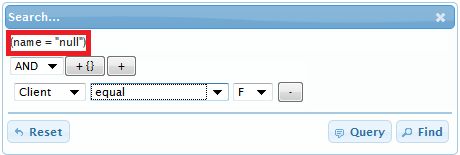
and on IE and Chrome:
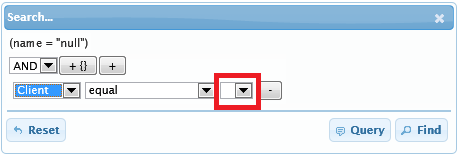
but after the click on the select box:
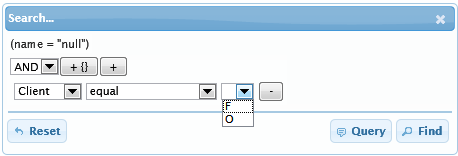
Moreover in many places of the code of grid.common.js one find code like
this.selected = “”
or
this.selected= “selected”;
or
ov.selected =”selected”;
where this or ov are DOM elements of the . The selected property of the DOM element is boolean and readonly (see here for example) and not string. One should probably
OlegKCurrently the loading from the GitHub not work, so I will test the suggestion later, but it seems to me that the fix is the real solution of the problem.
Best regards
Oleg
OlegKHi Tony!
I like that you think in the same direction as I am. I thought also about custom cell/column properties, but want not do too large changes because I don't known your opinion about this. Moreover the current implementatin of jqGrid has already implementation of the title attribute and it work even with custom formatters. So from the aspect of compatibility with the existing code I thought to implement first of all a solution for the title attribute and then suggest some more general solution for any attributes or properties.
It is important to define which properties can be used by the general custom properties. For example it should be clear for the developer which use jqGrid how all work if he use for example class property for the column in the colModel and use new custom way which ovewrite the property. I mean that itwould be nice to have less paremeters in colModel and have less situation when one colModel property ovewrite the other property. Nevertheless I think that one can solve the problem or at least include the corresponding part in the documentation. So I think that one general way to set any attribute or property of the column (cells of the column) would be the best way.
A general way for custom classes like changes of color or background color is very typical requirement. In the way one can reduce the requirement to write custom formatter for the date for example if one only need to change the color of some dates.
I am glad, that you like the idea.
Best regards
Oleg
P.S. I have some ideas about functions like dataInit and dataEvents used for the column at the end of grid loaging process (before loadComplete). The main idea is to fill the grid data as text in gridview:true mode, and then make some initializations after interting the text on the page. So one could make some work with DOM elemnts of grid. It could reduce the usage afterInsertRow in the most cases and makting some bindings. In the way one can use unobtrusive style of links or use some custom controls like raty plugin see the demo.
The main implementation idea is to use selectors like in the answer. It would be better that I describe all more exactly in the next post. I will try to do this today or tomorrow.
OlegKHi Tony,
I suppose that the code try to change the expretion like
NOT(X OR (Y AND Z))
to
((NOT X) AND NOT(Y AND Z))
or to
((NOT X) AND ((NOT Y) OR (NOT Z)))
which would be correct, but the implementation is buggy and the usage of NOT inside a block change OR to AND outside of the block.
Oleg
OlegKHi Tony,
It seems to me that all construction from compareFnMap where not() are used ('nc', 'bn', 'en', 'ni') work incrrect with OR ('any') operation. Try for example in “fixed” the demo for
(Client “does not end with” 'F') OR (Client “does not end with” 'O')
or (Client “does not contain” 'F') OR (Client “does not contain” 'O').
It will executed as
(Client “does not end with” 'F') AND (Client “does not end with” 'O')
or as (Client “does not contain” 'F') AND (Client “does not contain” 'O') instead.
I am not sure that the order of operators in compareFnMap correct is or probebly one have to insert call of _resetNegate() somewhere. It can be that one should modify this.orNot and this.andNot to use
this.andNot=function(f,v,x){
OlegKHello,
it seem me pure JavaScript question. Your code could be like following
var image_path1='./price1.img';
 var image_path2='./price2.img';
Copyright 2014 TriRand LtdAll Rights ReservedRSS
Back to Top