
 OlegK
OlegKHello Andrus,
I verified that in case of the typing
\<a
inside the searching toolbar the jqGrid send
filters={"groupOp":"AND","rules":[{"field":"Est","op":"cn","data":"\\<a"}]}
as the additional parameter to the server. It's absolutely correct. So you have to search for the error in your server code.
You second question about the usage of “formatter”: null seems a pure C# question
OlegKHello Tony,
I want to save your time. Andrus sent the tastcase me too. The colModel which he uses has settings like “formatter”:null. So one part of code of jqGrid interpret such settings as the custom formatter and not use autoencode: true.
I recommended him to remove the following options from the colModel which he generate:
"align":null,"classes":null,"formatter":null,"edittype":null,"editoptions":{"value":null,"maxlength":240},"formatoptions":null
The test case which reproduce the problem can be reduced to the following demo. Almost the same demo, but without the strange settings which I descrinbed above works without any problem.
Best regrads
Oleg
OlegKAfter I read the post I verivied in both documantation and the source code, but didn't found the formatter:'password'. So everything is clear. The formatter:'password'
OlegKI recommend you to use file instead of the database only in case of grid which has no editing features.
If you do want use JSON-file for editing the server code have to lock the file during the file modification. The exact implementation are depend on the language which you use.
The implementation of concurency is not exist per default if you use and database. Look at here to understand which things should be done to implement optimistic concurrency.
OlegKYou can just save the JSON data in the file. Depend on the jQuery version and from the settings on your web server it can be important which file extenstion you choose for the file having JSON data. Try to use .json file extension. See the demo which use the JSON file as an example.
Best regards
Oleg
OlegKThank you Tony!
I have seen that in my first topic I forget to include the most importan information – the link to my answer on the satckoverflow where I described my suggestion how to fix the described problem. I'm sorry. You can find the link
OlegKHidding is not the same as removing. If you have for example data like {id:5,total:10,free:20,used:30,percentage:40} you will recive the row in the table like
<tr id="5">
If you just remove the id column from the colModel you will have
<tr id="5">
So the data which will be produced on the page will smaller and you will not have the duplicates of the information. As the rowid will be used the id of the
So I recommend you better just remove the id column from the colModel. (See my answer on the same your question on the stackoverflow.com)
Best regards
Oleg
OlegKProbably Tony the problem can exist in case of usage loadonce:true.
Regards
Oleg
OlegKIs edithidden not what you need?
Regards
Oleg
OlegKHello Tomek,
corresponds to the HTML specification the ids of all elements must be unique on the page. You can easy solve the problem if you add in the data (but not in the column) of every grid the id proper
data: [
OlegKIt seems for me mostly like the wrong usage of row ids. One uses
data: [
OlegKYou are right Tony, the most of problems not exist more in the 4.1 version.
The problem with Reset button in the Singe Value Search dialog you can reproduce on the demo, which uses jqGrid 4.0, but the same demo work correct with jqGrid 4.1.
The problem with deleting of the last rule is the following. I mean that it is possible to click on the buttom which I mark red:

After that one receive the dialog
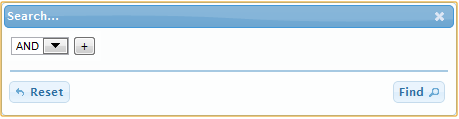
which is misunderstandable for many people.
The setting of focus in the Serching Dialog is probably more the question of the taste or ergonomy. Currently you have it on ADD/OR:
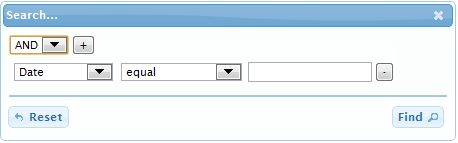
In my opinion the best place would be the last edit field:
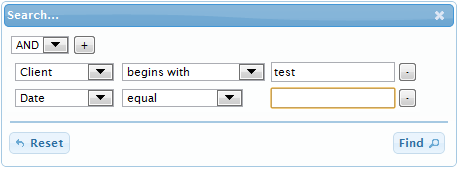
See the demo from the answer.
Some additional problem is that it is not so easy to impelment change focus behavior in the new searching dialog because the fields of the dialog fill be repaint. I have to overwrite/chain the reDraw method. It would be nice to have some additional events in the the Filter dialog. For example new events like
OlegKYou can use beforeSelectRow event handle to do this. Inside of your handler you can test something and then return false to prevent the row selection.
Regards
Oleg
OlegKTony,
I find your fix very good (it looks better as my suggestion), but you don't insterted jqID
OlegKHello Tony,
in general the hovering effects on the icons seems good in my opinion. One should just fix the code. The demo looks prity good. I added here the switching of action buttons in case of the standard editing.
The only thing which I personally not like in the actions formatter code is the usage of “onmouseover” and “onmouseout” instead of unobtrusive style
Copyright 2014 TriRand LtdAll Rights ReservedRSS
Back to Top