Editing
In previous chapters we have considered the server side CRUD operations and the related options for the particular field in colModel. It is time to consider users interaction with the different editing modules.
Cell editing
Cell editing provides the front-end user with functionality to change the contents of one single cell from a row and then the developer has the ability to handle the changed data by AJAX or in a jqGrid cell edit event (see below).
Cell Editing supports key navigation and editing individual cells, with the following behavior:
- When we click on a cell that is not editable, the cell is selected and we can use the up, down, left and right keys to navigate through the cells.
- If we move to a cell that is editable, we can press [Enter] to edit the cell. The cell is saved when we press [Enter] again, when we press [Tab], or when we click on another cell. If we press [ESC], the cell is not saved. When editing a cell, the cursor keys move only within the cell.
- When we click on cell that is editable, then we go directly into edit mode.
- The cell is not editable if it has a class 'not-editable-cell', instead that in colModel is set to be editable
- If the cell value is changed and saved successfully a class 'dirty-cell' is added. The class is added to the table cell. This allow custom cell visualization of the edited cell. If the cell is edited and the value is not changed the class is not added.
Cell editing module uses text messages from language file. The messages are used only when a validation is in action using the editrules colModel options
To activate cell editing mode set cellEdit grid option to true:
<?php
...
$grid->setGridOptions(array("cellEdit"=>true));
...
This is the only needed settings for editing cell values. All other setting like cellurl, cellsubmit type are configured automatically.
Cell Options
Cell editing properties are specific for cell editing and should be set in grid options (like the example above). A list of available cell editing options can be read from here
Cell Events
The events are related to the grid and should be used with setGridEvent.
<?php
...
$beforeeditcell <<< BEFORE
function(rowid, cellname, value, iRow, iCol){
alert("Before edit cell action");
}
BEFORE;
$grid->setGridEvent("beforeEditCell",$beforeeditcell);
...
The up to date list of events and additional JavaScript methods can be read here
In-line editing
In-line editing is a quick way to update database information by making changes directly in the row of the grid, as seen in the image below:
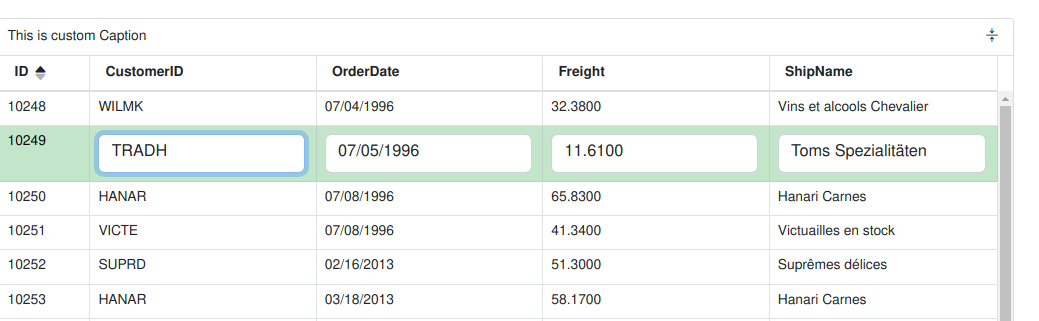
To use In-line Editing, users select a row with the mouse (or click a button). In response, jqGrid converts each editable field to a data entry cell, as seen in the CustomerId, Order Date, Freight, and ShipName fields above. Cells that aren't editable, such as the ID field above, don't change appearance and remain read-only. Whether an individual column is editable or read-only is controlled by setting the attribute in the ColModel.
When finished, users can hit the "Enter" key (or click a button) to save the data to the server.
In-line editing module uses text messages from language file. The messages are used only when a validation is in action using the editrules colModel options
Activation
In-line editing in Guriddo can be used by three different ways depending on the needs.
1.Using formatter actions as described here
<?php
...
$grid = new Guriddo\jqGrid\Render\Render($conn);
// Write the SQL Query
$grid->SelectCommand = '...';
// Let the grid create the model
$grid->setColModel();
// add formatter actions
$grid->addCol(array(
    "name"=>"actions",
    "formatter"=>"actions",
    "editable"=>false,
    "sortable"=>false,
    "resizable"=>false,
    "fixed"=>true,
    "width"=>85,
    "formatoptions"=>array("keys"=>true)
    ), "first");
...
2.Using the in-line navigator as described here
<?php
$grid = new Guriddo\jqGrid\Render\Render($conn);
...
$grid->setInlineNav();
...
$grid->renderGrid(...);
...
3.Using custom JavaScript code with setGridEvent method as show in the picture above.
<?php
$grid = new Guriddo\jqGrid\Render\Render($conn);
...
$onselrow = <<< ONSELROW
function(id, selected)
{
    // lastSelection should be defined as global variable
    // var lastSelection;
    if (id && id !== lastSelection) {
        var grid = $("#grid");
        grid.jqGrid('restoreRow',lastSelection);
        grid.jqGrid('editRow',id, {
            keys: true,
            onEnter : function(rowid, options, event) {

                if (confirm("Save the row with ID: "+rowid) === true) {
                    $(this).jqGrid("saveRow", rowid, options );
                }
                return false;
            }
        });
    }
    lastSelection = id;
}
ONSELROW;
$grid->setGridEvent('onSelectRow', $onselrow);
...
In-line Options
These objects/events are related to inline editing and should be used in grid options and not as parameters of the methods. The objects/events/ below have effect only in editRow (when keys: true) and saveRow methods. See below.
| Property | Type | Description | Default |
|---|---|---|---|
| ajaxRowOptions | object | This option allow to set global ajax settings for the row editing when we save the data to the server. Note that with this option is possible to overwrite all current ajax setting in the save request including the complete event. | empty |
| serializeRowData | function | If set this event can serialize the data passed to the ajax request when we save a row. The function should return the serialized data. This event can be used when a custom data should be passed to the server - e.g - JSON string, XML string and etc. To this event is passed the data which will be posted to the server | null |
| inlineData | object | If defined this object extends (overwrite) the values of the object posted to the server via saveRow method | empty |
| savedRow | array | This array stores the original values before editing the cell or row and is used in case the user press Esc (or button Cancel) to restore the original values of the edited row or cell. | empty |
Example :
$grid->setGridOptions(array(
    "ajaxRowOptions"=>array(
        "error"=>"js:function(response, status, error){ /*code here*/}")
));
In-line Methods
All the three ways of using in-line editing use the same JavaScript methods, which are build automatically from the script. To have more control below we describe these methods with the parameters. The complete description can be read from here
Form editing and viewing
jqGrid supports creating a form "on the fly" to view, add, edit, delete grid data. A screenshot of an "Add Record" form is shown below:
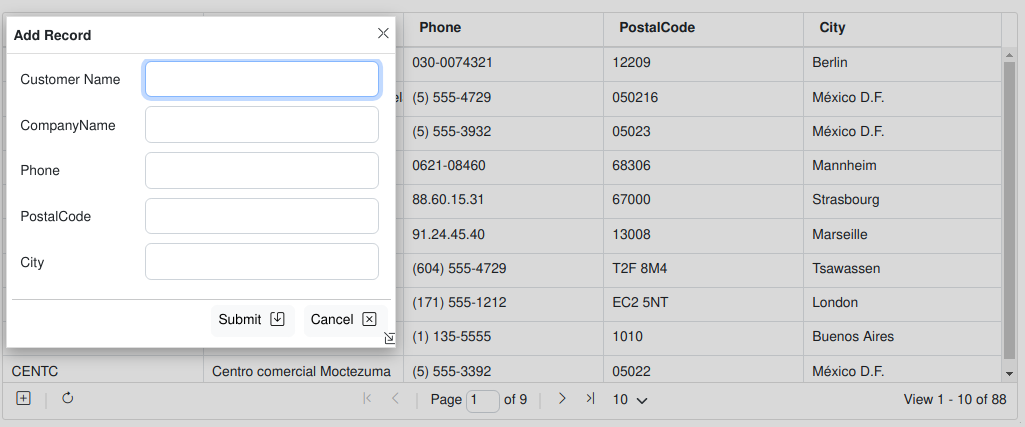
As of version 5.3 we fully support HTML5 forms. The html5 checking in the edit method (form editing) is supported via the option html5Check. Additionally to this it is needed to use the edittype option in colModel to define valid html5 input type and editoptions in the same colModel to enter supported attributes for that edittype.
<?php
...
$grid->setColModel(...);
$grid->setColProperty('Phone', "etittype"=>"tel",  array( "editoptions" => array(
    "pattern" => "^[0-9\-\+\s\(\)]*$",
    "placeholder" => "Phone number",
    "required"=> true
)));
// Enable navigator
$grid->navigator = true;
$grid->setNavOptions('edit',array(
    // Activate the HTML5 Checing
    "html5Check" =>  true,
    "recreateForm"=>true,
    "closeAfterEdit"=>true,
    "editCaption"=>"Update Customer","bSubmit"=>"Update"
));
$grid->setNavOptions('add',array(
    "html5Check" => true,
    "recreateForm" =>true,
    "closeAfterAdd"=>true
));
....
$grid->renderGrid(...);
The Form editing in Guriddo jqGrid is activated with setting the navigator property to true as described in Navigator chapter
<?php
require_once 'path_to_your_project_vendor_dir/autoload.php';
...
// Create the jqGrid instance
$grid = new Guriddo\jqGrid\Render\Render($conn, 'pdo');
...
$grid->navigator = true;
...
By default this enables buttons on the pager with the following action - add, edit, del, search, refresh, export to excel. The view and other export actions are disabled. To enable/disable any action use setNavOptions with first parameter navigator like this.
<?php
...
$grid->navigator = true;
$grid->setNavOptions('navigator',array('add'=>false, "view"=>true, "pdf"=>true));
$grid->renderGrid(...);
The above code disables the action add record and enables view record and export to pdf.
Edit grid row
As described above to enable the edit mode you will need to setup navigator property to true. Actually this operation is performed with the JavaScript method editGridRow
This method creates a form via modal dialog for editing a particular row from the grid.
This method uses Common Editing Properties from colModel and editurl option from jqGrid.
This method uses Form options from colModel properties.
To set a particular option and event in the edit form use
setNavOptions($module, $options)
setNavEvent($module, $event, $code)
Example
<?php
...
$grid->setNavOptions('edit', array("height"=>"auto","dataheight"=>"auto", "width"=>"450"));
$beforecheck = <<<BEFORE
function(postdata)
{
    postdata['Freight'] = postdata['Freight'].replace(".","").replace(",",".");
    return postdata;
}
BEFORE;
$grid->setNavEvent("edit", "beforeCheckValues", $beforecheck);
...
When called after click on edit button on the pager, the constructed form can look like this:

The method uses the following options from language file (Example - English):
$.jgrid.regional["en"] = {
  ...
    edit : {
    // formedit options
        addCaption: "Add Record",
        editCaption: "Edit Record",
        bSubmit: "Submit",
        bCancel: "Cancel",
        bClose: "Close",
        saveData: "Data has been changed! Save changes?",
        bYes : "Yes",
        bNo : "No",
        bExit : "Cancel",
    // Validation options
        msg: {
            required:"Field is required",
            number:"Please, enter valid number",
            minValue:"value must be greater than or equal to ",
            maxValue:"value must be less than or equal to",
            email: "is not a valid e-mail",
            integer: "Please, enter valid integer value",
            date: "Please, enter valid date value",
            url: "is not a valid URL. Prefix required ('http://' or 'https://')",
            nodefined : " is not defined!",
            novalue : " return value is required!",
            customarray : "Custom function should return array!",
            customfcheck : "Custom function should be present in case of custom checking!"

        }
    },
  ...
}
These options (except edit.msg) can be overwritten when passed as options to the method. When passed to the method we should use by example bSubmit : "Submit" and not $.jgrid.regional["en"].edit.bSubmit : "Submit"
The up to date edit Options and Events can be read here
To call a method in custom java script code use the following convension.
jQuery("#grid_id").jqGrid('editGridRow', rowid, properties );
Where
- grid_id: the id of the parent grid
- rowid: the id of the row to edit
- properties: an array of key => value pairs, including any of the above properties or events.
What is need to know?
When the form is constructed we set the following rules:
- Hidden fields are included in the form with the display:none property of the table row
- The id of the editable element is constructed from the name of the colModel array - the property name
- The name of the editable element is constructed from the name of the colModel array - the property name
- For ease in manipulating the elements in an edit form, every table row in the form that holds the data for the edit has a id which is a combination of "tr_" + name (from colmodel). Example:
<form ....>
  <table>
    <tr id='tr_myfield'>
      <td> Caption</td> <td>edited element named, in colModel, as "myfield"</td>
    </tr> ...
  </table>
</form>
- Every time the form is lunched it is recreated. The recreateForm parameter is set to true just remember the position of the form
This allow us to easily show or hide some table rows depending on conditions using beforeShowForm event.
What is posted to the server
When we are in editing mode the data that is posted to the server is object {} that contain:
- the name:value pair where the name is the name of the input element represented in the form (this is for all input elements)
- additionally we add a pair id:rowid where the rowid is the id of the edited row (the name id is replaced automatically with the primaryKey name)
- additionally we add a pair oper:edit to indicate the edit mode. This parameter is then get from php script to determine the mode of updating and to execute the appropriate method.
- if the editData object is not empty we extend this data with the posted data
- if the returned object from onclickSubmit event is not empty we extend the posted data with this object
Add grid row
The editGridRow method is also used to add data to the server and grid, by passing "new" as the rowid.
This method creates a form via modal dialog for adding a particular row to the grid.
This method uses Common Editing Properties from colModel and editurl option from jqGrid.
This method uses Form options from colModel properties.
All what is valid for editing a row is valid for adding a row except that the form is empty and the filled data is added to the table and not updated.
All the events and options are the same as those from Edit grid row
How is the form constructed
When the form is constructed we set the following rules:
- Hidden fields are included in the form with the display:none property of the table row
- The id of the editable element is constructed from the name of the colModel array - propery - name
- The name of the editable element is constructed from the name of the colModel array - propery - name
- For ease in manipulating the elements in an edit form, every table row in the form that holds the data for the edit has a id which is a combination of “tr_” + name (from colmodel). Example:
<form ....>
  <table>
    <tr id='tr_myfield'>
      <td> Caption</td> <td>edited element named, in colModel, as "myfield"</td>
    </tr> ...
  </table>
</form>
This allow us to easily show or hide some table rows depending on conditions using beforeShowForm event
What is posted to the server
When we are in add mode the data that is posted to the server is object {} that contain:
- the name:value pair where the name is the name of the input element represented in the form (this is for all input elements)
- additionally we add a pair id:_empty where the _empty indicates that new row is inserted
- additionally we add a pair oper:add to indicate the add mode which then is get from the php script to determine the add
- if the editData object is not empty we extend this data with the posted data
- if the returned object from onclickSubmit event is not empty we extend the posted data with this object